
Linux下载与Linux系统安装(CentOS 8)
1、Linux下载
Linux下载方法,请根据以下步骤与图示来下载CentOS 8版本,如果Linux下载过程中有什么疑问,请咨询风哥(http://www.fgedu.net):
Linux下载第1步,输入下图网址,进入The CentOS Project网站下载linux,选择”Get CentOS Now”,出现:Download CentOS
As you download and use CentOS Linux, the CentOS Project invites you to be a part of the community as a contributor. There are many ways to contribute to the project, from documentation, QA, and testing to coding changes for SIGs, providing mirroring or hosting, and helping other users.

Linux下载第2步,选择”DVD ISO”然后进入旧版本的CentOS Linux下载列表。

Linux下载第3步,在”The following mirrors in your region should have the ISO images available”列表中,选择一个下载源,即可下载相应的X86_64位版本。
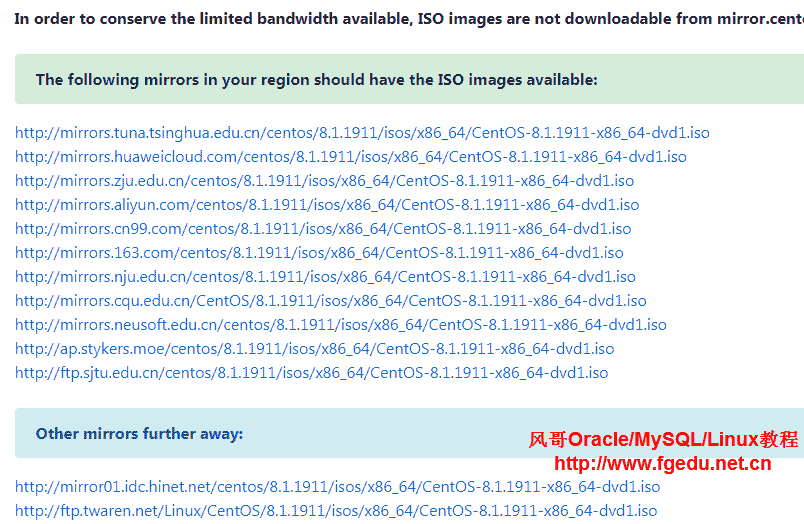

2、Linux下载百度网盘地址,CentOS 8下载地址
目前红帽CentOS8发布的Linux版本及发布时间如下:
CentOS 8.1 13-Jan-2020
CentOS 8.0 11-Oct-2019
对应的CentOS Linux ISO安装镜像列表如下:
CentOS-8.1.1911-x86_64-dvd1.iso
CentOS-8-x86_64-1905-dvd1.iso
Linux下载百度网盘链接:

3、Linux操作系统安装配置-免费视频教程(RHEL/CentOS 8.x、RHEL/CentOS 8.x)
http://www.fgedu.net.cn/569.html
CentOS 是 RHEL(Red Hat Enterprise Linux)源代码再编译的产物,而且在 RHEL 的基础上修正了不少已知的 Bug ,相对于其他 Linux 发行版相对还是比较稳定。
更多Oracle/MySQL/Linux教程,请加风哥QQ交流群:189070296、150201289
本文由风哥教程整理发布,仅用于学习测试使用,转载注明出处:http://www.fgedu.net.cn/10327.html

